Ubiquiti Deployment at the BuildOps Office: Scalable Network, CCTV & Access Control
Engineering a resilient, scalable office network architecture requires a design model that treats physical hardware expansion as a routine software deployment. When a high-velocity enterprise transitions into a new corporate facility, engineering choices made on day one determine whether subsequent growth cycles encounter zero-downtime transitions or face severe network failure loops.
Our commercial systems integration team at YesTechie completed a full-scale infrastructure lifecycle deployment for BuildOps, an industry-leading software company that builds enterprise field service management platforms for commercial contractors. Because their internal corporate infrastructure demands continuous cloud data exchanges, heavy engineering compilation cycles, and non-stop HD video communication, network uptime directly controls their company's daily operational efficiency.

This case study breaks down how we structured a unified, multi-floor network, high-density wireless matrix, corporate access control array, and edge AI video surveillance system designed to scale dynamically alongside a rapidly increasing corporate headcount.
Project at a Glance
Site Overview
- Location & Client: BuildOps Corporate Headquarters, Los Angeles, CA
- Industry Vertical: Enterprise SaaS / Field Service Management Technology
- Project Scope: Multi-Floor Infrastructure Scaling, High-Density Wireless, & Complete Access Automation
Network & Routing Infrastructure
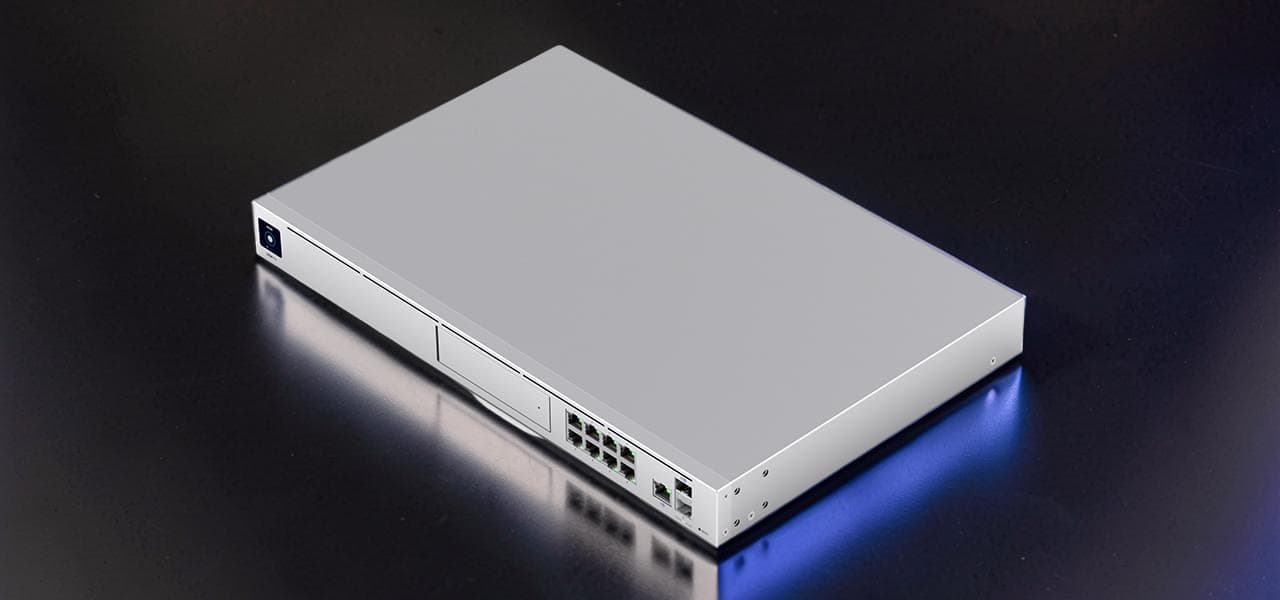
- Core Engine: High-Capacity UniFi Enterprise Security Gateway Architecture
- Core Switching Nodes: UniFi Layer 3 PoE Switching Infrastructure (Cascaded Distribution)
- Wireless Access Layer: UniFi E7 WiFi 7 Enterprise Access Points (Upgraded from U6 Pro Base)
Surveillance & Storage Hardware
- Access Security Devices: UniFi Access G2 Reader Pro Configurations (5 Secure Paths)
- Visual Defense Layer: UniFi G6 Bullet High-Resolution Surveillance Cameras
- Unified Control Console: Centralized UniFi Core Software Interface (Zero Ongoing Licensing Fees)
- Conference AV Integration: Logitech Rally Systems paired with Dedicated Logitech Tap IP Controllers
Client Needs and Requirements
When BuildOps initially mobilized our team during their relocation to a new office facility in Los Angeles, their technical team was operating with approximately 50 on-site employees. However, their executive growth strategy mapped out an aggressive hiring path designed to scale headcount past several hundred team members within months, with near-term plans to lease a second, separate floor inside the same office tower. They required a robust, modern scalable office network architecture capable of accommodating this rapid expansion smoothly without forcing disruptive structural overhauls or costly configuration rebuilds down the line.

Our on-site engineering evaluation mapped out four critical infrastructure targets:
- High-Density Wireless Reliability: Uncompromised wireless signal stability across a dense engineering team dependent on massive file pushes, cloud code repository syncing, and continuous customer-facing presentation calls.
- Streamlined Enterprise Access Control: Eliminating legacy physical brass keys entirely across the facility, deploying a digital credential matrix that allows administrators to onboard new employees or alter regional door policies within seconds.
- Centralized Visual Safeguards: Strategic deployment of network surveillance cameras covering critical office zones and equipment racks for immediate incident verification and asset protection.
- Zero-Friction Scalability: An underlying network framework built from day one to integrate an entire secondary office floor via a clean, single-pane management dashboard, preventing isolated data silos.

Initial Access, Network, and Camera Setup
During the initial move-in phase, our field engineers constructed a high-performance technology backbone designed to operate reliably during heavy office use while establishing a foundation for upcoming expansions.
We targeted the primary front entrance and the rear employee paths, executing a complete UniFi Access G2 Reader Pro deployment. The G2 Reader Pro handles multiple secure authentication methods, including secure NFC keycards, smartphone credentials via the UniFi Access mobile application, PIN access, and automated facial recognition. The hardware interfaces directly with low-voltage electronic locking hardware, clearing the entrance path in under a second and automatically locking the structural doors the moment the frame returns to the latch position.

The baseline routing and access layer was powered by an enterprise UniFi gateway paired with a high-density PoE switch. This core stack handled administrative routing, corporate VLAN division, and supplied continuous Power over Ethernet to edge cameras, readers, and wireless access points. For the initial wireless distribution layer, we deployed UniFi U6 Pro access points, plotting their positions across the first active floor to ensure clean signal handoffs between working bays and open collaboration zones.
Concurrently, we anchored UniFi G6 Bullet cameras across critical structural perimeters and entry nodes. These devices capture crisp, high-contrast video, feeding streams straight into the centralized UniFi Protect software application.
This initial configuration followed the same engineering standards we apply across complex commercial sites where network stability, door access, and visual defense run over a single, unified local area network backbone, a structural blueprint similar to our high-security industrial warehouse deployment.

Seamless Multi-Floor Expansion Engineering
Within twelve months of the initial phase sign-off, the BuildOps team scaled their on-site headcount from 50 to nearly 200 active employees. To accommodate this rapid hiring surge, the company activated their lease on a completely separate floor within the same building structure. In an ad-hoc or consumer-grade network setup, this type of sudden structural expansion typically causes major infrastructure lag, duplicate licensing costs, and fractured local management dashboards. Under our UniFi design model, scaling the workplace was executed with almost no operational downtime.

Our technicians ran multi-gigabit copper links directly between the floors to link the spaces into a single, cohesive local site. On the newly acquired floor, we executed the expansion with precision:
- Access Switching Integration: Installed an additional enterprise UniFi PoE switch into the secondary floor’s distribution frame, cascading it straight back to the primary core router.
- High-Density Wireless Upgrades: Extended the wireless footprint across the new floor plan. During this hardware expansion, we updated the original floor's U6 Pro base units to the newly released UniFi E7 enterprise access points, deploying seven E7 APs across the complete multi-floor layout.

Transitioning the facility to these enterprise-grade devices delivered a cutting-edge WiFi 7 backbone capable of sustaining high client density. This deployment mirrors the technical methodology we use to implement multi-gigabit wireless upgrades across demanding enterprise food production facilities where massive automated data handling requires exceptional wireless capacity.
From an administrative perspective, the multi-floor expansion required zero complex re-engineering. The client's internal IT managers simply adopted the new switches and E7 access points into their existing UniFi controller, allowing the global corporate wireless profile to expand across both floors automatically. New door access paths were mapped into existing corporate user role groups within the centralized dashboard in minutes, preventing any disruption to daily software engineering workflows.

Conference Room AV Integration
Modern technology spaces require meeting spaces to perform reliably as clear digital communication hubs. To ensure the BuildOps sales, engineering, and support groups could run customer software demonstrations and internal sprint reviews without technical friction, we integrated premium collaboration setups into two corporate conference rooms.

We specified and installed Logitech Rally conference systems, providing studio-quality 4K optics, automated camera tracking, and ultra-crisp modular audio arrays that capture every speaker in the room clearly. The communication hardware is paired with a dedicated Logitech Tap IP touch controller positioned directly on the central meeting tables.
The Tap IP interfaces directly with the office calendar network, enabling employees to launch complex multi-point video conferences with a single touch. This clean layout moves the room away from messy cable configurations, dongles, or erratic third-party audio mixers.

One-Year Operational Status Metrics
Following a full year of continuous runtime and a major multi-floor physical-scale expansion, the unified low-voltage infrastructure handles heavy daily workloads with exceptional stability. The current corporate technology footprint consists of the following active components:
- Daily User Profiles: Close to 200 full-time corporate employees utilize high-speed wireless networks and automated door entry systems simultaneously.
- High-Capacity Wireless Layer: 7 enterprise UniFi E7 access points delivering seamless, high-throughput wireless coverage across both office floors.
- Automated Physical Security Matrix: 5 secure internal and external doors controlled via UniFi Access G2 Reader Pro units running customized corporate authorization schedules.

- Visual Defense Coverage: Multiple UniFi G6 Bullet cameras capturing continuous high-resolution feeds across entry nodes and technical spaces.
- Unified AV Collaboration: 2 executive conference rooms completely optimized with Logitech Rally video arrays and Tap IP touch consoles.

Results and Major Operational Advantages
The long-term performance of the BuildOps deployment underscores several key advantages of a unified, enterprise-grade hardware strategy over fractured, multi-vendor setups:
- Uncapped Headcount Scaling: The client expanded their on-site team by 300% without hitting local wireless capacity bottlenecks, dropping connection speeds, or causing access credential lag at entry points.
- Elimination of Software License Fees: Because the Ubiquiti framework operates on an entirely license-free corporate IT infrastructure model, BuildOps pays zero monthly or yearly software seat fees for their access control paths, network management, or camera systems. This saves thousands of dollars annually compared to traditional corporate access platforms.
- Single-Pane-of-Glass Management: The office IT staff controls corporate network security routing, guest wireless access rules, employee door schedules, and high-definition video logs from a single dashboard interface, minimizing administrative overhead.
- Clean, Professional Workplace Styling: The sleek profile of the G2 Reader Pro devices, the clean integration of the ceiling-mounted G6 Bullets, and the hidden cabling paths of the Logitech AV units match the modern aesthetic of a top-tier software facility.

B2B Infrastructure Principles for Fast-Growing Software Offices
For technology firms and corporate enterprise groups anticipating aggressive hiring paths or structural facility expansions, this deployment demonstrates several important low-voltage guidelines:
- Build for the Next Floor Today: Specifying core routing gateways and distribution switches with high port allocations and power budgets during the initial build ensures you can accommodate an entire secondary floor later by simply dropping in a new access switch.
- Enforce Single-Site Network Logic: Running multiple floors under a single managed network site allows newly adopted devices to inherit global corporate SSIDs, firewall rules, and security profiles automatically upon connection.
- Select Performance-Focused Hardware: Transitioning to high-capacity nodes like the UniFi E7 line ensures your wireless network maintains massive data throughput capacity as user density spikes. To ensure your office layout is backed by professional network engineering, partner with an experienced enterprise wifi installation team to map your physical space accurately.
- Adopt Role-Based Security Groups: Structure your access control credentials around user roles (e.g., Engineering, HR, Executive) rather than individual door permissions. This setup allows you to integrate additional doors into the system instantly by simply assigning the new path to an existing role group.

About YesTechie
YesTechie operates as a nationwide systems integration firm headquartered in Los Angeles, California, delivering enterprise-grade network engineering, physical security architecture, smart door access control, and corporate audio-visual automation. As certified Ubiquiti deployment specialists, our team builds high-performance, unified technology systems for corporate headquarters, industrial manufacturing complexes, logistics centers, high-security storage assets, and multi-floor commercial properties.
Our engineers focus on removing technical friction from expanding workplaces. By matching high-throughput hardware with clean, single-dashboard management interfaces, we ensure your facility's infrastructure supports your team's operational needs today while scaling smoothly for future growth. To view our comprehensive project history or review our design capabilities, explore our complete portfolio of commercial low-voltage services.

Partner Perspective
This corporate project brief was produced in collaboration with the technical documentation team at Pipl Systems, who joined our engineers on-site to audit the long-term field stability of the multi-floor system. Oleg Bordiian, Founder and Creator of Pipl Systems, explained why long-term case studies offer the highest value metric for corporate technology evaluators:
"For me, case studies are one of the most valuable references for both system integrators and security technology manufacturers. Especially when an evaluation is conducted a full year after the initial deployment - rather than just at the launch stage. That is the exact milestone where you can conclusively prove that a solution meets real business requirements and performs reliably over time, not just during a controlled presentation.
Over twelve months, this facility scaled from 50 to nearly 200 employees across two distinct floors. The UniFi ecosystem scaled smoothly alongside the business - maintaining excellent wireless performance, flat latency, and strict security across all entry paths. What started as an initial hardware installation has become a critical utility for daily business operations. This case study demonstrates not only the reliability of the underlying technology but the value of specialized integrator expertise."
— Oleg Bordiian, Founder of Pipl Systems (Review the full B2B operational audit via Oleg's Professional Low-Voltage Technology Overview on LinkedIn).
Ready to Scale Your Office Technology Infrastructure?
If your corporate team is relocating to a new office facility, outgrowing your current network infrastructure, or managing fractured security software platforms, building a unified low-voltage plan is essential. Our enterprise engineering group provides complete on-site tech evaluations and custom system design services tailored to your team's growth objectives. Connect with our engineering consulting group today to submit your floor plans and establish a reliable, high-performance technology foundation for your workplace.
- Project Consultation Intake: Schedule a Professional On-Site Infrastructure Assessment
To check out the precise enterprise UniFi hardware components utilized throughout this multi-floor SaaS office installation, you can source your inventory directly via our verified affiliate link: Official Ubiquiti Enterprise Store.
Field Tour: Watch the Office Deployment Walkthrough
To see the physical hardware integration across the BuildOps facility and review the centralized UniFi software dashboard in action, watch our complete on-site project review here:
FAQ: Corporate Office Network & Access Engineering
Does a multi-floor corporate Ubiquiti deployment require recurring software license fees?
No. One of the primary advantages of the UniFi ecosystem across enterprise environments is its completely license-free software model. Unlike traditional enterprise infrastructure brands that charge mandatory recurring monthly or annual seat fees for user profiles, door paths, or connected cameras, the UniFi Network, Access, and Protect platforms require no software subscriptions. You buy the physical hardware and retain full management access without ongoing operational license fees.
How does a multi-floor facility scale its wireless network without causing signal drops?
To scale a wireless network across separate floors cleanly, our technicians run multi-gigabit physical backbone drops directly between the distribution frames of each floor, bridging them into a single managed network site. When new enterprise access points, such as the UniFi E7 units, are connected to the new floor's switch, they instantly adopt your existing corporate SSIDs, security rules, and user VLAN settings, allowing staff to roam between floors without experiencing connection drops.
What authentication methods does the G2 Reader Pro support for corporate offices?
The UniFi Access G2 Reader Pro is a wall-mounted access control node that supports high-speed NFC badges, digital mobile credentials via the UniFi Access smartphone application, secure PIN configurations, and automated facial recognition. The device includes a built-in high-definition camera that generates real-time visual logs inside the management console, letting administrators verify exactly who triggered a door release.
Can the same management console run the office internet network, access control, and surveillance cameras?
Yes. The unified design of the UniFi ecosystem allows network routing rules, wireless SSIDs, electronic door entry logs, and high-definition camera streams to run through a single software console. This integration removes the need to train your internal IT team on multiple separate manufacturer programs or toggle between separate dashboards to investigate a security incident.
How does role-based access control simplify the onboarding of new employees?
Role-based access control allows administrators to build global permission templates based on job functions (e.g., Engineering, Sales, Admin) rather than setting up unique access rules for every single employee. When a new hire joins the team, they are simply assigned to their department's pre-configured role group. Their digital credentials instantly inherit the correct door permissions, building schedules, and entry rules across every multi-floor path.
What type of security cameras are ideal for monitoring internal office spaces?
For modern corporate offices, we regularly deploy UniFi G6 Bullet or compact dome cameras. The G6 Bullet delivers high-resolution video capture, advanced edge AI object classification, and crisp night vision, making it an excellent choice for tracking main entrance paths, equipment closets, server racks, and high-traffic common spaces. The streams are managed directly inside the UniFi Protect software application for seamless playback.
Does YesTechie provide technology deployment services for corporate offices nationwide?
Yes. YesTechie is a nationwide Certified Ubiquiti UniFi Integrator headquartered in Los Angeles. Our low-voltage field teams design, deploy, and support projects across the United States, and we provide remote network architecture design, hardware pre-configuration, and project coordination for multi-site commercial enterprise clients.